Built for Clover · App Market listing in reviewBuilt on Square's APIEnglish + Español
Your AI front desk on the Clover or Square you already run.
Paloma answers the calls you forward to it, in English and Spanish, and takes the whole order over the phone — items, options and the guest’s name. The guest pays by a text link — or at pickup, if you prefer — and the order lands in your POS like any counter order.
Starting costs you nothing: no card, no payment, no subscription. When your first business is activated, Paloma puts $25 on its balance as a gift — spend it on any feature, at the price list. Once per account; you add money only if you want to.
One phone order, from the first ring to the kitchen ticket
Press play to hear it; the scenes follow the call. A sample call — your menu and your POS take its place.
- 2× Margherita 12"28.00
- 1× Caesar, no anch.11.50
- Tax3.46
- Total42.96
- Paid by link✓
- Rosa’s Pizza · line 2
Friday, 6:41 pm. Two people on the counter, one on the oven. Nobody is free — this call used to go to voicemail, and the guest used to call the next pizzeria.
- Paloma
Hi, this is Paloma, the AI assistant for Rosa’s Pizza. This call is recorded for quality. How can I help?
- Caller
Two twelve-inch margheritas and a Caesar, no anchovies.
- Paloma
Two Margherita twelve-inch and one Caesar, no anchovies, pickup at 7:05. That comes to $42.96. Want the payment link by text?
- SMS to the guest
A Clover-hosted checkout page, sent while the guest is still on the line. No card number is ever spoken, typed by us, or stored.
- Clover
Paid — $42.96, straight to your merchant account. We are not in the flow of funds and never see a card number.
- Rosa’s Pizza kitchen
The order lands in your POS like any counter order, marked paid. A call card is waiting in the app — what the guest wanted, what Paloma did, what needs your yes.
Uber Eats, DoorDash and Grubhub, straight into your POS
Nobody re-typing orders. Delivery-app orders print in your kitchen next to your own, in the Clover or Square you already run.
It prints by itself
The app hears “accepted” only once the ticket is in your POS. An order that could not get in comes to you as a card, with the minutes left to decide.
Slammed? Add time
“Plus 15 minutes on the apps” — Paloma adds prep time on every marketplace and takes it off at the end of your day.
Ask what came in
“What came in from DoorDash tonight?” — the orders, their numbers and what has to be ready by when.
Switched on location by location: you link your Uber Eats, DoorDash and Grubhub stores once, through the delivery service Paloma works with. On Clover each app gets its own order type, so your reports split them. Each app’s commission stays between you and the app.
Learn more: Delivery apps in your POS- Uber Eats#48212 items34.50In the kitchen
- DoorDash#11933 items21.80Ready
- Phone#04183 items42.96Paid
- Grubhub#77021 item18.20In the kitchen
Plus 15 minutes on the apps, we’re slammed.
Done — 15 more minutes on Uber Eats, DoorDash and Grubhub. It comes off by itself at close.
- Paid
- Courier on the way to Rosa’s Pizza
- Picked up
- At your door
Arriving about 7:32 pm
Text: your courier picked up your order.
Delivery from your own site. Paloma sends the courier.
A guest orders delivery on your page and pays you. Paloma books a courier, the guest follows it on your page, and no marketplace takes a cut of the order.
Couriers without drivers on staff
A courier is booked the moment the order is paid — by itself, or after your Approve, as you choose.
The price is on the order
You pay Paloma’s delivery price shown on the order, plus the guest’s tip, all of it the courier’s — with a card you attach in the app. If delivery gets dearer before the courier is booked, you approve the new price; for couriers that book by themselves, a small rise within the limit in our Terms goes ahead.
No courier, no charge
If no courier shows up for the order, or one cancels before pickup, the hold on your card is released and nothing is charged. An order left without a courier is yours to hear about at once — deliver it yourself or hand it over at the counter.
Switched on restaurant by restaurant. If your guests pay through Stripe, couriers come out of your balance instead of a card. Not yet for businesses on our Clover App Market app: pickup only there for now.
Learn more: Your own deliveryYour own website, in your own design
Not a marketplace page: a site of your own, built from your POS and dressed in your colours, fonts, logo and banners. Guests order from you — a marketplace can keep up to 30% of an order, Paloma takes no commission on your site.
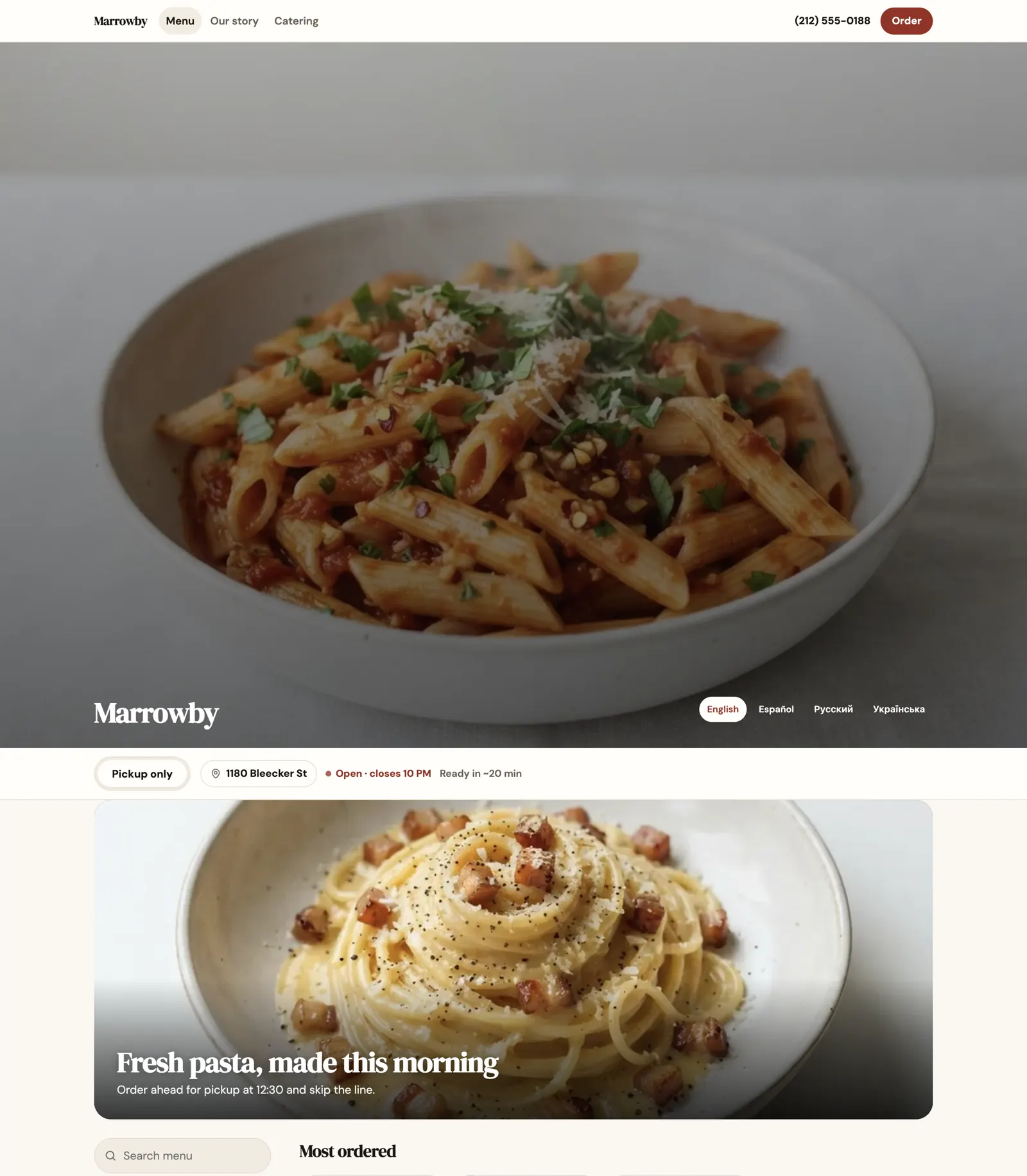
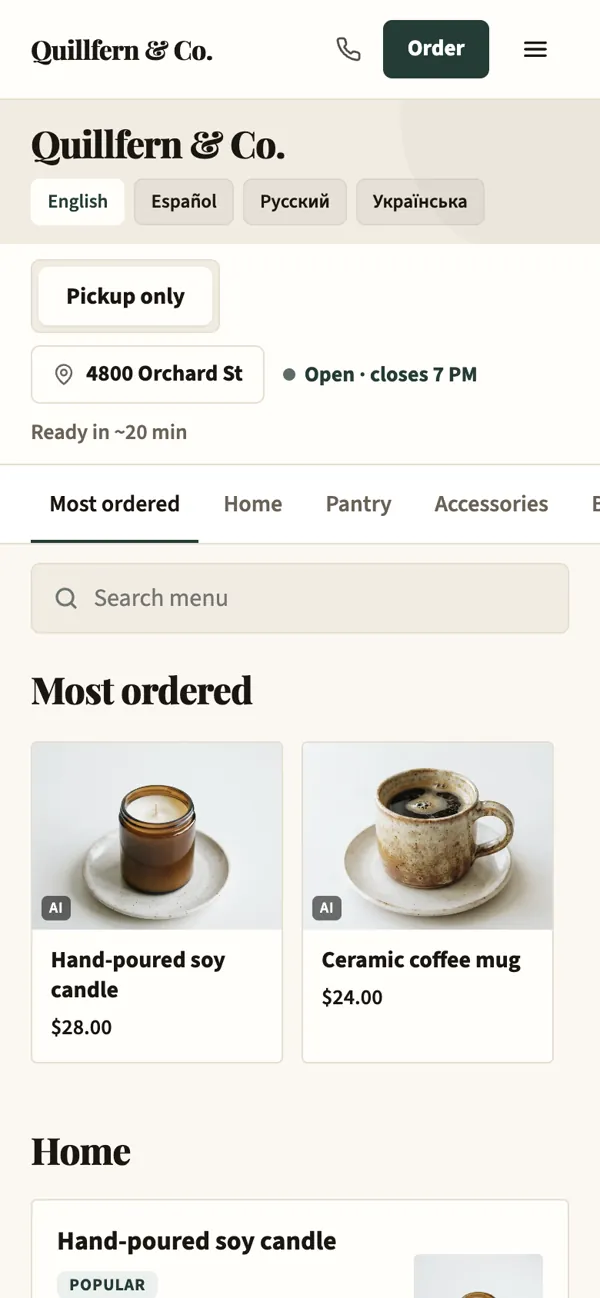
Your look
From your logo, your sign or a site you like.
A page for every dish
Found in search, one tap to order.
Pages by talking
“Add a catering page” — a preview, then your yes.
Four languages
English, Spanish, Russian, Ukrainian.
Your own domain
yourname.com, with its own certificate.
Rolling out
Set it up yourself, from this page
No call with sales, no installer. Four steps from this page to your first answered call.
Sign up
With your email or your Google account, then add your business.
Confirm it’s you
Confirm your email (signing up with Google already does) and your mobile number with a code we text you. Your business switches on by itself, and Paloma gives your first business $25 on its balance — a one-time gift to spend on any feature.
Connect Square or Clover
Square in one screen. Clover with keys from your own Clover dashboard, in about ten minutes; the app shows every step.
Forward your number
Your ordering page goes live and Paloma answers the calls you forward to her — the app shows the codes for your carrier.
Starting costs you nothing: no card, no payment, no subscription. When your first business is activated, Paloma puts $25 on its balance as a gift — spend it on any feature, at the price list. Once per account; you add money only if you want to.
What changes the first night
The same Friday rush, before and after you forward the number.
Tonight, without Paloma
- Busyat the rush, a guest who calls while you are on another call can get a busy tone or voicemail
- Up to 30%kept by a delivery marketplace on an order from your own regular
- Voicemailmessages to play back and guests to call back after closing
- Mondaywhen you finally look at how the weekend actually went
Tonight, with Paloma
- 5 at oncecalls at most, picked up together in English or Spanish; the next one rings your team’s phone if you set one, or hears where to order online
- 0%commission on orders through the ordering site Paloma builds you
- 10 secto read a call card: what they wanted, what Paloma did, what needs a yes
- 6:00 amyesterday in numbers, waiting before you unlock the door — or at the hour you choose
What you see the morning after
Every call becomes a card. The numbers answer in one sentence. And anything that touches money or a guest waits for your yes.
- InboxEvery call as a card, not a voicemail
- PalomaYesterday in one sentence, and a brief before you open
- ApprovalsNothing acts in public without your yes
Example screens, drawn from the app
Recordings and disclosure
The guest is told the call is recorded in the first sentence. Recordings are kept 30 days, then deleted — and they are never used to train models.
Everything Paloma does
One connection to your Clover or Square, and the work below gets done. Nothing to migrate, nothing to re-key, and nothing acts in public without your yes.
Answers your phone
Your phone, picked up in English or Spanish, during the rush and after closing.
An AI receptionist that says so
Hours, allergens, parking — from your POS and your own notes. It names itself an AI in the first sentence.
A card for every call
What they wanted, what Paloma did, what needs your yes — with the recording and transcript.
Keep your number
Paloma gets a local number; forward the calls you miss, or all of them. Turn it off any time.
Every text to a guest, word for word
Read each text guests get in your name; payment links, confirmations and courier updates can be switched off. Their replies land in your Inbox.
Takes the orders
From the phone, your page and the delivery apps — every order in the Clover or Square you already run.
Phone orders, paid by link
Real menu items and modifiers, a full read-back, a payment link by text. The order lands in your POS, marked paid.
Online orders, now or for later
Guests order from your own page for pickup, right away or for a time they pick. Straight into your POS.
Regulars reorder in one tap
Guests sign in with a code texted to their phone; their addresses and Order again are waiting.
Uber Eats, DoorDash and Grubhub in your POSRolling out
Marketplace orders print in your Clover or Square next to your own. Ask Paloma what came in, and when the kitchen is slammed, say the word and she adds prep time on the apps.
Delivery by courierRolling out
Paloma books a courier for your own online orders. You pay Paloma’s delivery price shown on the order, plus the guest’s tip for the courier, with a card you attach in the app. Not yet for businesses on our Clover App Market app: pickup only there for now.
Orders through AI assistantsRolling out
Guests can order from you in ChatGPT: the PalomaCEO.ai plugin reads your current menu, confirms the order with the guest and hands them your checkout. Other AI assistants that read the web or use tools can do the same.
No order slips by
Every order pings your phone and, if you like, your team’s Telegram group. Any tablet in your kitchen can be Paloma’s order screen: each new order rings on it until someone accepts it, and if nobody does in 3 minutes, your phone hears about it. It opens nothing but orders and the stop list; the delivery apps’ own tablets stay on as before. On Clover, a ticket that did not print raises an alert with Print again.
Catering you confirm before anyone pays
Guests request a large pickup order ahead of time on your page, within the minimum and the lead time you set. You approve or decline it in the app; the guest gets a text either way, and can pay only after your yes.
Busy Mode for a full kitchen
Tell Paloma the kitchen is slammed, or set how many orders you take per 15 minutes, and “as soon as possible” moves later on your page and on calls. Guests still order; nobody is turned away.
Your own ordering site
No marketplace cut: guests order from you, on a site built from your POS and changed by talking.
Your colors, your logo, 0% commission
Menu, prices and stock straight from the POS; say “refresh the menu” and it is read again at once. A big catalog is sorted into departments and shelves.
Rewards for guests who come back
A loyalty program for your regulars: guests get points back — 5% unless you set another rate — when they buy at your register (by the phone number they give, or a card they once paid with alongside that number) and on orders from your own ordering page and phone line, and spend them on your ordering page. Points have no cash value. You switch it on with one approval.
Gift cards on your pageRolling out
For businesses on Square only; not on Clover. Guests buy your own Square gift card on your ordering page and spend it there or at your register. You issue the cards: no fees for guests, and they never expire. The money goes to your Square account; Paloma takes no cut, Square keeps its 2.5% when a card is activated. You switch it on with one approval and allow gift cards in Square once.
Your own app for guests, no app store
Guests add your ordering page to their Home Screen, and the page shows each phone how. It opens like an app with your name and logo, and it sends notifications only when the guest asks, only about their own order. No App Store or Google Play account needed.
A website you change by talking
Ask in the chat for a new page, a photo, a banner or new hours, and Paloma puts it up.
A page for every dish
Your own words about a dish become its page, written so Google and AI assistants can find and quote you.
Your menu in four languages
English, Spanish, Russian and Ukrainian, translated for you. Guests see the one their phone speaks.
Frequently bought together
Suggestions from your own receipts, and what goes well with a dish from your menu.
On your own domainRolling out
Point your domain at Paloma: the app shows the one DNS record to add and tells you when it is live.
Markets the place
Posts and videos written from your menu and photos. Nothing is posted without your approval.
Posts to seven networks, planned aheadRolling out
Google Business Profile, Facebook, Instagram, TikTok, YouTube, LinkedIn and Threads — a week or a month at a time, on a calendar, each after your approval. Paloma reads your Google reviews, tells you about a bad one and drafts a reply that goes on Google only when you approve it.
Videos for Reels, TikTok and YouTubeRolling out
A video cut from your menu, or an atmosphere video Paloma generates and marks as AI.
One Instagram post, every networkRolling out
Turn it on, and each new Instagram post is offered for your other accounts, one card at a time.
Printed promo cards that bring new guests
Tell Paloma your own offer (for example, $10 off a first online order of $30 or more), approve it, and print cards with a QR code. A new guest scans it and gets your offer on your ordering page, once. The offer can ask for the guest’s email with their consent to your news. You see how many used it, what they spent and how many joined your list.
Emails to guests who opt inSoon
Your ordering page already asks guests, unticked, whether they want your news; sending to them is coming soon.
Knows your numbers
Ask the way you would ask your manager. Every answer comes from your own POS.
Ask about your business
Sales, refunds, stock, shifts and calls, answered in one sentence — typed or spoken, in any language.
A brief before you open
Yesterday in numbers, what needs your yes and what looks off — at 6:00 or the hour you choose.
What Paloma brought in
Orders, calls answered and money taken through Paloma, counted from your POS and Paloma’s own records. Anything that is an estimate says so.
Your year, before and after
Revenue and orders from the year before Paloma, next to what came after.
Paloma speaks up first
When something looks off — a slow day, a best seller running out — Paloma writes to you first, with what to do.
Runs with your team
Your yes on what matters, your people in their roles, your data yours.
Your yes on what matters
A refund, a post, a change Paloma suggests — each waits on a card until you Approve it or say no.
Your team, with roles
Invite managers and staff with a link; each sees what their role allows.
Several locations
Each with its own menu, hours and number, in one business.
Your data stays yours
Export everything with one tap. Delete the business and its data is erased 30 days later.
Help without leaving the app
Say “I need help”: Paloma fixes what she can and passes the rest to our team, whose answer comes to your Inbox.
Paloma in your own AI tools
Paloma’s tools in Claude, Cursor or your own agent with an API key, with the same approvals.
Without a mark: on for every business that connects.Rolling outworks, switched on business by business.Soonnot yet.
Safe in front of your guests
The rules we will not trade away. They are what makes an AI on your phone line acceptable — to your guests, and to Clover and Square.
Always disclosed
Paloma names itself as an AI in the opening sentence. A caller who asks for a person goes to your team when you give Paloma a transfer number; otherwise it takes a message and flags it for you.
Payments stay on Clover and Square
Cards are entered on their hosted pages only. Money goes to your merchant account; we never see a number.
No model training on your data
Your sales, catalog and call recordings serve you and nobody else. Recordings are kept 30 days, then deleted.
Your own database
Every business gets an isolated database. Delete the business, or disconnect your only point of sale, and its data is erased 30 days later.
- CloverBuilt for CloverConnect today with keys from your own Clover dashboard, in about ten minutes; our App Market listing is in review.What Paloma reads from Clover
- SquareBuilt on Square’s APIConnect today in one screen, on Square’s production API; not yet listed in the Square App Marketplace.What Paloma reads from Square
Questions owners ask first
How long until it works?
Mostly as long as it takes you: sign up, connect Square in one screen or Clover with keys in about ten minutes, and forward your number. Paloma reads your menu, hours and sales within a few minutes of connecting, and your business switches on by itself once your email is confirmed — signing up with Google confirms it — and you confirm your phone with a code we text you.
Do I need Clover or Square?
No. With Clover or Square, Paloma works on top of them, and they stay your system of record: Paloma reads your catalog, hours and stock through their official APIs and writes orders back the same way. Without one — or with a system Paloma does not connect, such as Toast — Paloma can keep your menu: send a photo of your paper menu or your website’s address, approve the list and set your sales tax, and guests order on your page and by phone and pay at pickup. Paloma is not a register: it takes no payments at the counter and does not see counter sales.
Will guests know they are talking to an AI?
Yes, in the first sentence of every call. That is a rule in the product, not a setting you can forget to turn on. When someone asks for a person, Paloma hands the call to your team if you give it a transfer number in Settings; otherwise it takes a message and flags it for you.
Can I keep my number?
Yes. Paloma gets a local number of its own, and you forward your line to it — only the calls you miss, or all of them. The app shows the codes for your carrier; turn forwarding off and your phone rings as before.
What if my balance hits $0?
The balance never goes below zero. At $0 the features that use AI pause until you add funds, and new calls go to your business phone number set in the app — if none is set, callers are told where to order online. Your ordering pages and checkout keep working.
Can Uber Eats, DoorDash and Grubhub orders go straight into my POS?
We are switching it on location by location. Once your stores are linked — once, through the delivery service Paloma works with — their orders print in your Clover or Square next to your own, and the app hears “accepted” only after the ticket is in your POS. Ask Paloma what came in; when the kitchen is slammed, tell her and she adds prep time on every app. Each app’s commission stays between you and the app.
Can Paloma deliver orders from my own site?
Rolling out restaurant by restaurant: when a guest orders delivery on your page, Paloma books a courier and the guest follows it there. You pay Paloma’s delivery price shown on the order, plus the guest’s tip for the courier, with a card you attach in the app; a courier that never shows up, or cancels before pickup, costs you nothing — the hold on your card is released. If your guests pay through Stripe, couriers come out of your balance instead. Not yet for businesses on our Clover App Market app: pickup only there for now.
How does the guest pay?
A payment link by text, opened on a Clover- or Square-hosted page. The money goes to your merchant account, and we never see a card number. With your menu kept in Paloma, guests pay you at pickup.
What happens to an order Paloma gets wrong?
Every order is read back before it is placed, and it lands in your POS where you edit it like any other. The call card keeps the recording and transcript so you can hear exactly what was said.
Who can see my data?
You and the people you invite, each as far as their role allows. Every business has its own database, and your data is never used to train models. Our support team opens a business only to answer a request or to set it up with you, for at most an hour at a time, and the reason is recorded in your business’s security log.
Can Paloma post to our Google Business Profile, Facebook and Instagram?
Rolling out to pilots now — Google Business Profile, Facebook and Instagram, and also TikTok, YouTube, LinkedIn and Threads. You connect each account with that network’s own sign-in. Ask for one post or a month of them: Paloma writes each from your menu and photos, puts it on your Posts calendar for the day and hour you choose, and it goes out only after you approve it in the app. From October 20, 2026, each account you connect costs $7 a month from your balance; an account you never connect costs nothing. Paloma also drafts a reply to a Google review; it goes on Google only when you approve it. Disconnect any time and the access is deleted.
Can I turn it off?
Any time, from the app. Paloma stops using your POS access at once: a Square connection is revoked at Square, and a Clover API token stops working once you delete it in your Clover dashboard. If that was your only point of sale, your data is deleted 30 days later.
Forward your number tonight. Unforward it tomorrow if the kitchen disagrees.
Sign up and connect Square in one screen, or Clover in about ten minutes with keys from your own dashboard. Once your business is switched on, forward your number. No card to start, no commitment.
Prefer we set it up with you?
You can start on your own in the app. If you would rather set Paloma up together with us, or hear it on your own menu first, tell us who you are and we will write back. It is free.
A month of posts, planned in one conversation
Tell Paloma what is coming — a dish that is back, a holiday, game night. It writes each post from your menu and photos and puts it on your calendar for the day and hour you choose, on every network you connect. Nothing goes out until you approve it.
Pumpkin pizza is back
Instagram, Facebook, 11:00
ApproveChangeSeven networks
Google Business Profile, Facebook, Instagram, TikTok, YouTube, LinkedIn and Threads.
Videos made for you
A video cut from your menu photos, or an atmosphere video Paloma generates and marks as AI.
Your calendar, your yes
Every post waits on the Posts calendar: approve it, change the words or the time, or say no.
Instagram, everywhere
Turn it on and keep posting on Instagram: each new post is offered for your other accounts.
Each account you connect is $7 a month from your balance, from October 20, 2026; an account you never connect costs nothing. Writing the posts uses your AI balance like any other answer, and AI pictures and videos are paid from it by the price list.
Learn more: Marketing